
The second operating system I used (after TrsDos) was CPM on a Z80 development machine. Some time ago I build the Z80 MBC2 board and I played with CPM again. I included a fully working MBC2 emulation in my Z80 IDE program but after using DosBox I got the idea of creating CpmBox. CpmBox is a full CPM 2.2 implementation on a Z80 emulator for Windows, including a VT100 terminal and 8 CPM disks based on the MBC2 with the looks of a real terminal. It is a portable windows program (one single executable) and the zip file contains the emulator, a directory with a lot of disks and the bootdisk and a dos based directory to load CPM files from and to dos. It is also possible to save and load programs from dos and save or load them to a CPM disk. It is freeware and I hope you like it. . Regards, Hein Pragt.
Copyright
I respect copyright and I will not distribute illegal software. Part of this program was inspired by the Z80 MBC2 project and the boot disk and bootloader are from this project. I kept them as they are. The CPM disks are filed with old CPM based software I had in my collection and I filled the first 6 disks with all kind of software. Legally some of this software maybe is still copyrighted BUT in my opinion the copyright was from 40 to 45 years ago, these products have not been on the market for a lot of years and I think that most company’s will not complain. I do not ask any money for this package and the main goal is to keep the old spirit alive. I anyone can identify him or herself as a legal copyright owner and has problems with the distribution I will remove that content. But I seriously believe there is no one to object to distributing these old artifacts as freeware. My program itself is closed source but freeware.
What is inside this emulator
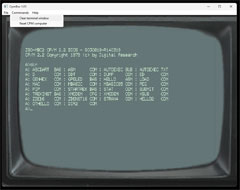
This emulator is exactly like a Z80 MBC2 computer running CPM 2.2 (without the i/o chip) and connected to a VT100 terminal.
- Emulates: Z80 and VT100 terminal;
- OS: CPM 2.2;
- Keyboard: full 53 keys emulated by the PC keyboard;
- CPU: Zilog Z80 the speed is depending on the PC hardware;
- RAM: 64 kb;
- Textmode: 24 x 80 characters;
- Graphics: None;
- Color: White on green screen;
- Sound: None;
- I/O: 15 CMM disks and access to DOS disk;
- Design: Like an old terminal screen.
Download
Here you can download the latest version if this CpmBox emulator. This download is a zip file containing a portable x64 (and a x32 version) Windows exe programs, a directory with CMP disk images and a directory for DOS based CPM files. It is a portable program, just unpack it somewhere on the disk and start it by clicking it. This program is digitally signed with my own code certificate and it is trusted by Microsoft windows.
Download x64 (and x32) version 1.01 of CpmBox (2022)
- Version 1.01
- First (beta release) version, the program has been testen by myself on my hardware.
CPM disks
I made some disks for this program and I got a question about how to make and maintain the disk image files. I have searched for a solution myself for a while until I found a utility program called cpmtools. But it were command line tools and not so user friendly. Then I found a gui for this toolkit and although the visual views are sometimes a little strange because of misinterpreted characters, it works fine. I zipped the complete directory as it is on my disk, including the correct disk definitions. You can download it here. Just download it and unpack it somewhere at your harddisk. Just doubleclick: CpmtoolsGUI.exe.

First you select a disk image in the upper left corner (or create a new one) and then you select the disk format. I use the disk formats of the MBC board project, use d0 for bootdisk 0 and d1 for alle other disks. You can now select the directory on you own harddisk in the right corner and you can select a file in the cpm view of the dos view and use the buttons to mover them from dos to cpm, or from cpm tp dos. I can read other cpm disk formats as well. This way you can create your own cpm file repository on your hardisk and copy them to the cpm disk images. This tools is not that user friendly and not very beautiful in UX but ir works fine for me.
More pages on emulator software
[catlist name=”Emulators”]


