A nice feature of the Internet is online radio (also web radio, net radio, streaming radio, e-radio, IP radio, Internet radio). These are digital audio services transmitted via the Internet. Broadcasting on the Internet is usually referred to as webcasting since it is not transmitted broadly through wireless means. Internet radio involves streaming media, presenting listeners with a continuous stream of audio that typically cannot be paused or replayed, much like traditional broadcast media. The first Internet radio service was launched in 1993. Nowadays most popular radio stations also have an Internet radio stream and there are a lot of specialized radio stations, for instance I really like outlaw country music, and I have a few nice stations in the USA. Kind regards, Hein Pragt.
So building an Internet radio is not that hard, we need a HTTP stack and a MP3 decoder. Both are available at a very good price, and we also add a simple display and a button to select a station. I have a 3D printer so I created a nice case as well. Lets start with the part list:
Connecting everything up is not that hard, although the pins on the ESP32 are very hard to read because the text is very small. Also check the pins of the ESP32 board you have, I have noticed some difference in different boards. The name of the pin is the clue you have to follow. The entire device is powered through the micro-usb port of the ESP32. Load the code in the Arduino IDE (you have to make sure it supports the ESO32 first) and you may have to download some additional libraries like the “ESP_VS1053_Library-master” and the “esp8266-oled-ssd1306-master” library. Find the place in the code where you have to put your WIFI network name and password and compile the code.
After uploading the software it will say a welcome phrase and then connect to the WIFI. It will remember the last station you selected and then start streaming the MP3 data to the MP3 codec and you will hear the internet radio station. I really like this little device and I have filled the array in the source code with a few radio stations, you can delete and add your own, as you like and personalize the device. Have fun.
// ----------------------------------------------------------------
// ESP32 + VS1053  Internet radio
// Hein Pragt 2022
//
// VS1053 - connections
// XRST = EN (D3)
// MISO = D19
// MOSI = D23
// SCLK = D18
// VCC = 5V / 3.3 V  and  Gnd = Gnd
// ----------------------------------------------------------------

#include <VS1053.h>
#include <Preferences.h>
#include "StartMp3.h"
#include <WiFi.h>
#include <HTTPClient.h>
#include <esp_wifi.h>
#include "SSD1306.h"

char ssid[] = "your wifi ssid";
char pass[] = "your wifi password";

Preferences preferences;
SSD1306     display(0x3c, 21,22);
WiFiClient  client;

unsigned int counter,old_counter;
int change = 13;
bool pinflag = true;
int status = WL_IDLE_STATUS;
uint8_t mp3buffer[128];

struct _stationList {
  char sname[64];
  char host[128];
  char path[128];
  int  port;
} stationList[] = {
{ "NPO Radio 1 " ,   "icecast.omroep.nl", "/radio1-bb-mp3", 80 },
{ "NPO Radio 2 " ,   "icecast.omroep.nl", "/radio2-bb-mp3", 80 },
{ "NPO 2 S & J " ,   "icecast.omroep.nl", "/radio6-bb-mp3", 80 },
{ "NPO 3FM     " ,   "icecast.omroep.nl", "/3fm-bb-mp3", 80 },
{ "NPO 3FM Alt " ,   "icecast.omroep.nl", "/3fm-alternative-mp3", 80 },
{ "NPO Radio 5 " ,   "icecast.omroep.nl", "/radio5-bb-mp3", 80 },
{ "538 Radio   " ,   "20073.live.streamtheworld.com", "/RADIO538.mp3", 80 },
{ "QMusic      " ,   "icecast-qmusicnl-cdp.triple-it.nl", "/Qmusic_nl_live.mp3", 80 },
{ "Radio 10    " ,   "25533.live.streamtheworld.com", "/RADIO10.mp3", 80 },
{ "Radio 10 70 " ,   "22343.live.streamtheworld.com", "/TLPSTR18.mp3", 80 },
{ "Radio 10 80 " ,   "25233.live.streamtheworld.com", "/TLPSTR20.mp3", 80 },
{ "Radio 10 90 " ,   "25353.live.streamtheworld.com", "/TLPSTR22.mp3", 80 },
{ "Radio 10 Love" ,  "25293.live.streamtheworld.com", "/TLPSTR04.mp3", 80 },
{ "Veronica    " ,   "22343.live.streamtheworld.com", "/VERONICA.mp3", 80 },
{ "Sky Radio   " ,   "25293.live.streamtheworld.com", "/SKYRADIO.mp3", 80 },
{ "Country Rocks" ,  "stream.dbmedia.se", "/crrMP3", 80 },
{ "Outlaw Country" , "ice10.securenetsystems.net", "/KIEV2", 80 },
{ "~" ,   "0", "0", 80 },
{ "~" ,   "0", "0", 80 },
{ "~" ,   "0", "0", 80 },
{ "~" ,   "0", "0", 80 },
{ "~" ,   "0", "0", 80 },
{ "~" ,   "0", "0", 80 },
{ "~" ,   "0", "0", 80 },
{ "~" ,   "0", "0", 80 },
{ "~" ,   "0", "0", 80 },
{ "~" ,   "0", "0", 80 },
{ "~" ,   "0", "0", 80 },
{ "~" ,   "0", "0", 80 },
{ "~" ,   "0", "0", 80 },
{ "~" ,   "0", "0", 80 },
{ "~" ,   "0", "0", 80 },
{ "~" ,   "0", "0", 80 },
{ "~" ,   "0", "0", 80 },
{ "~" ,   "0", "0", 80 },
{ "~" ,   "0", "0", 80 },
{ "~" ,   "0", "0", 80 },
{ "~" ,   "0", "0", 80 },
{ "~" ,   "0", "0", 80 },
{ "~" ,   "0", "0", 80 },
{ "~" ,   "0", "0", 80 },
{ "~" ,   "0", "0", 80 },
{ "~" ,   "0", "0", 80 },
{ "~" ,   "0", "0", 80 },
{ "~" ,   "0", "0", 80 },
{ "~" ,   "0", "0", 80 },
{ "~" ,   "0", "0", 80 },
{ "~" ,   "0", "0", 80 }
};


// Wiring of VS1053 board (SPI connected in a standard way)
#define VS1053_CS    32
#define VS1053_DCS   33
#define VS1053_DREQ  35

#define VOLUME  100      // volume level 0-100

VS1053 player(VS1053_CS, VS1053_DCS, VS1053_DREQ);

// -----------------------------------------
// Setup and init
// -----------------------------------------

void setup ()
{
display.init();
display.invertDisplay();
display.setFont(ArialMT_Plain_16);
display.normalDisplay();
display.setColor(WHITE);
display.drawString(0,0,"  ESP32 Radio");
display.setFont(ArialMT_Plain_10);

   pinMode(change,INPUT_PULLUP);
   Serial.begin(115200);
   delay(500);
   SPI.begin();
   player.begin();   // initialize VS1053 player
   player.setVolume(VOLUME);

   WiFi.begin(ssid, pass);
   while (WiFi.status() != WL_CONNECTED) {
     delay(500);
     Serial.print(".");
   }
  Serial.println("WiFi connected");
  Serial.print("IP address:");
  Serial.println(WiFi.localIP());
  display.setColor(WHITE);
  preferences.begin("my-app", false);
  counter = preferences.getUInt("counter", 0);
  old_counter = counter;
  delay(100);
  player.playChunk(StartUp, sizeof(StartUp)); //VS1053 is wake up & running
  delay(1000);
  station_connect(counter);
}


// -----------------------------------------
// Main loop
// -----------------------------------------

void loop()
{
  // Play stream
  if (client.available() > 0) {
     uint8_t bytesread = client.read(mp3buffer, 128);
     player.playChunk(mp3buffer, bytesread);
  }
  // Check key
  if (digitalRead(change) == 0 and pinflag == true) {
    pinflag = false;
    counter++;
    if (stationList[counter].sname[0] == '~') { // Empty field
      counter = 0;
    }
  }
  if (old_counter != counter) {
    player.softReset();
    pinflag = true;
    station_connect(counter);
    old_counter = counter;
  }
}


// -----------------------------------------
// Connect to radiostation
// -----------------------------------------

void station_connect (int station_no)
{
  if (client.connect(stationList[station_no].host,stationList[station_no].port) ) {
    Serial.println("Connected now");
  }
  client.setNoDelay(true);
  Serial.print(String("GET ") + stationList[station_no].path + " HTTP/1.1\r\n" + "Host: " + stationList[station_no].host + "\r\n" + "Connection: close\r\n\r\n");
  client.print(String("GET ") + stationList[station_no].path + " HTTP/1.1\r\n" + "Host: " + stationList[station_no].host + "\r\n" + "Connection: close\r\n\r\n");
  display.clear();
  display.setFont(ArialMT_Plain_16);
  display.drawString(0,0,"ESP32  Radio");
  display.drawString(0,21,"Station: " + String(station_no));
  String line4 = String(stationList[station_no].sname);
  display.drawString(0,42,line4.substring(0,60));
  display.display();
  preferences.putUInt("counter",station_no);
  Serial.printf("Set counter to new_value: %u\n", station_no);
}
To compile the code you will need some libraries, i have used the next libraries:
I also have a 3D printer and I design using Freecad so I made my own case for this internet radio.


 The ESP8226 is a very cheap Wi-Fi microcontroller with a complete TCP/IP stack and a 32 bit microcontroller and is made by the Chinese manufacturer Espressif Systems. The chip came to attention in 2014 by a small board (ESP-01) as a cheap Wi-Fi module that could be controlled via a serial interface and through a form of Hayes commands. Soon the chip came to the attention of hackers, mainly due to its low cost, to find other uses. For the low amount of money, the specifications are impressive: a 32-bit RISC CPU (Tensilica Xtensa LX106) with an 80 MHz clock frequency, 64 Kb instruction RAM, 96 KB data RAM, external QSPI flash (512 Kb to 4 Mb), built-in IEEE 802.11 Wi-Fi stack, WEP and WPA/WPA2 authentication, 16 GPIO pins, SPI, I2C, UART and a 10-bit ADC. There are some nice cheap DIY boards for sale with this microcontroller and this page contains information about these boards, documentation, links and specifications, and development tooling. Also a full working sourcecode of a WIFI led controller. Sincerely, Hein Pragt
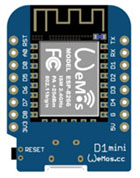 A relatively small manufacturer by the name of Wemos brings out nice new developments with the ESP-8266 family on Arduino type shields. One of these fun boards to experiment with yourself is the Wemos D1 mini, a small board equipped with a full Wi-Fi and network stack, a nice number of I/O ports, power supply, a USB connection, serial communication, bootloader, Flash memory and a 32 bit processor with an 80 MHz clock frequency. As in all very nice specifications for a board that costs less than 10 dollar. When you are already used to the standard Arduino IDE and programming environment, you can also use this for the Wemos D1. The correct boards have to be installed in the board manager of the IDE, but then it works almost immediately. There are already many libraries specifically for the ESP-8266 family available for the Wemos D1 mini but I find that many of the standard libraries written for the Arduino also work fine on the Wemos D1 mini. Because I2C and SPI also work standard, many of the boards and shields that are made for the Arduino can also be connected, please note that everything must work on 3v3, but this can also be solved with a level adjustment board or a resistance network. But a standard LCD display or a relay board can easily be connected. Sometimes a few I/O pins have to change definitions and often it works fine. But with 4 Mb of code space and 35 Kb of ram and a 32 bit processor at 80 MHz which is a huge improvement over the 16 MHz 8 bit Arduino processor with 1 to 2 Kb sram. The possibilities of the Wemos D1 mini are therefore very extensive, partly due to the built-in Wi-Fi that you can use ready-to-use.
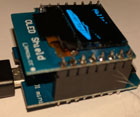
 The first display I used is the WeMos D1 mini OLED shield 64×48 of 0.66 inch with an I2C interface. The shield has many more pins because it can also be controlled differently but of course we like to use I2C because it only uses two I/O lines. At 0.66inch it is quite a small display but is very easy to read as it has a high contrast. It uses the SSD1306 as the interface chip and uses the I2C address 0x3C or 0x3D which can be selected by a solder bridge on the back of the PCB. Very small, so I don’t dare and leave them at the default value. The device was delivered with separate header pins and since you only have 4 connections If you need it, you can also solder the wires directly to the PCB.
 Download:


 The display I used is a fairly standard OLED cheap display with white pixels, a resolution of 128 x 64 pixels and a control by means of I2C by the the SSD1306 driver IC. This shield also only needs two data lines and it consumes minimal current so that it can also be used in projects that need to be powered by a battery or battery. The size of this screen is slightly larger than the previous one and measures 26.0 x 15.0 mm. The module runs on 3v3 and can be connected to the outputs of the 3v3 output of the ESP32 and the I2C lines do not need voltage converters. The I2C address of this OLED shield is 0x3C by default. The screen is very clearly readable due to a very high contrast. The SSD1306 is a single-chip CMOS OLED/PLED driver with controller for displays with a maximom resolution of 128 x 64. The IC contains a display controller with display RAM and a built-in oscillator so that it can be used with minimal external components. It has a built-in 256 steps brightness control. It has a 6800/8000 series compatible Parallel Interface and a I2C interface.
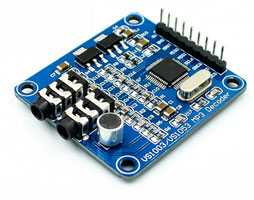 The VS1003 audio codec module is a complete MP3/WMA/MIDI audio decoder and ADPCM encoder that features a high quality stereo DAC (Digital to Analog Converter), a 16-bit adjustable ADC (Analog to Digital Converter) and a high quality stereo earphone driver (30 ohms). This module is ideal for adding audio decoding and encoding capabilities to embedded systems. It has a serial data and control interface (SPI) that makes it easy to connect to the ESP32 or any othe board that has an SPI interface. It also has a headphone and audio output interface and a microphone for recording but we cont be using this. It supports MP3 and WAV stream and has a single 5 V power supply that is On-board converted to 3.3 V and 2.5 V for the chips on the board and it uses about 800 mA. When we feed it with 32 bytes chunks of audio data, it will decode and output the audio trough the headphone jack. We can connect this to an amplifier to play it on a stereo set or PC speaker set.




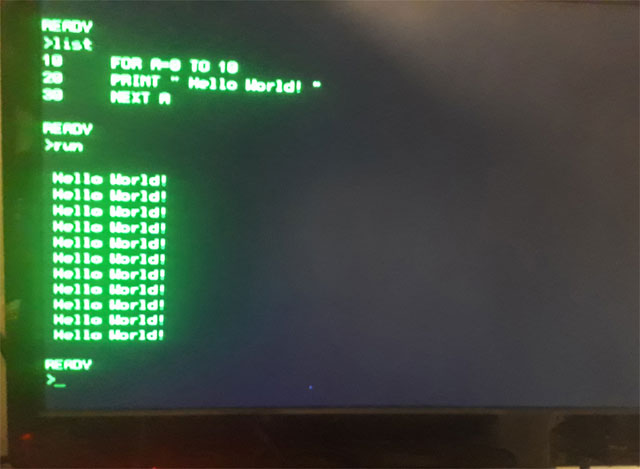


 I found an interesting project on the Internet of a Z80 processor on a breadboard that was connected with wires to an Arduino Mega board. It had some code with it, it was far from complete but it triggered me. I adopted the idea and improved it, rewrote the Arduino code and improved the hardware design. The Z80 processor in this project is running at 200 Khz, clocked from the Arduino and the Arduino emulates 8 kb of ROM and 6 kb of RAM and serial input and output. With this simple and cheap configuration you have a complete working Z80 based computer. With some adjustments I even got a complete Basic interpreter running on this hardware with the serial I/O of the Arduino as interface. But it is also nice to write your own assembler code and see it not only running in an emulator, but also on a real Z80 processor. Just put your generated HEX code in the memory.h file and recompile the Arduino sketch and upload it to the Mega board. On reset the Z80 will execute the code in the ROM section of the MEGA. Have fun! Regards, Hein Pragt.


