A while ago I bought an old box with integrated circuits that had been stored for many years and contained a lot of tubes with very old IS’s. As I like to build old processor boards and try to repair old computers and boards, these chips were very welcome. In one tube there were two original P8052-Basic chips and that brought back good memories of the time mid 80ties of last century when I was working as head R&D embedded programmer and hardware designer for a small company and was using the 8031 processor a lot. I even extended a tiny Basic version at that time, but the real P8031-Basic was incredible and complete, but expensive and hard to get at that time. I put these chips in my computer chips and cpu collection and one I kept aside to make a board to get it working again. I had a latch and a memory chip in my workshop, a PCB was also there, I only needed to order a few 11.0592 crystals as these are not so common anymore. After two evenings of wiring it was finally ready and at my first attempt to run it I got a line number error all the time. I seemed that the external sram was not working and it was a small wiring error. After I had fixed that it worked like a charm, I connected it to my VT100 terminal with the TTL serial input and after pressing the spacebar I got the prompt and I could write a small Basic program. On this page I will show you the schematic I made, some build instructions and some documentation and (source)code. Regards, Hein Pragt.
I also have a Facebook Group on Retro Computing and Electronics, feel free to join!
Why do we need at least 3 chips
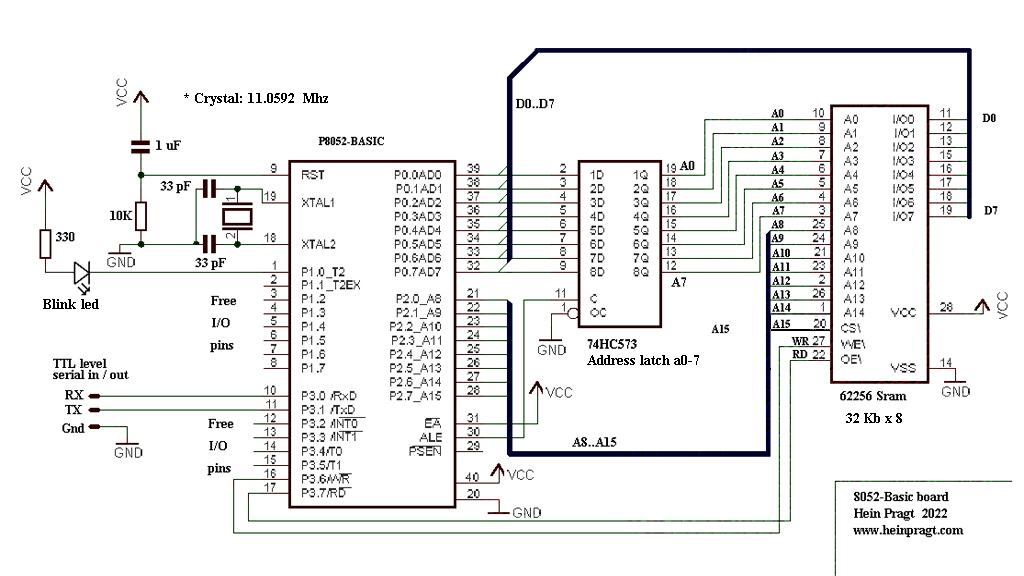
To answer the question why we need al least 3 chips I have to explain the 8031 bus a little. To make room for as many I/O pins as possible Intel decided to multiplex the low part of the addresses and the 8 bit databus on one port. This would mean only 8 pins of the chip instead of 16 pins. Of course you would need an external latch for decoding the 8i address bits and the chip needed a pin to signal the output of the address part. Port 1 is actually a 8 bit data out and a 8 bit data in and a 8 bit address out port. The 74573 chip is often used as an 8 bit latch, this will store the 8 bits and save them (kind of like a 8 bit memory chip) to provide the lower 8 bits of the external memory address when reading or writing to external memory. Then we need a external memory chip, we can use anything between 8 and 128 x 8 sram chips, I chose the 32kb x 8 chip (62256) as I had these laying around. I use A15 as a chip select signal, the chip select pin is active low, so the A15 pin selects to lower 32Kb part. When using other chips you have to figure out yourself how to select the chip and put the unused address lines to ground. This is the minimum configuration and all we need to add are a small reset circuit and the crystal oscillator circuit and were done. Below is my schematic I made of my design.

Building the board
When building this I use a PCB board that is double sided and not too small so I have room to wire the circuit. I put all the chips in sockets, to be able to reuse them again and protect the chips when soldering. I first put the sockets on the board and leave enough space between them for the wires, then I solder the sockets. Then I solder four pin connectors in one corner, two for the power +5v and Gnd, and two for the Tx and Rx lines. Then I solder the crystal near the processor pins, leaving room for the capacitors and I solder them to the correct pins of the processor socket. Then I do the same with the reset capacitor and resistor.

The next thing is wiring and soldering all the power lines, I use red wire for the +5V and black wire for the Ground. I use solid kernel wire that is available in a lot of colors. I avoid going over the soldering points and like using a PCB layout go around the chips as much as possible. After this I wire the control and chips elect R/W lines using gray / white and orange wire. Then I take yellow wire and connect all the address lines, I try to keep the wires as much together as possible. Now it becomes a little tricky as the AD lines need both a address and a data latch wire. I use blue for the data latch and green for the databus lines. First I solder the blue wire to the socket pin and then carefully on top of that the second green wire. Make sure you do not use to much solder otherwise you can short two pins. I you shorted two pins, take the solder od with a solder pump and try again.

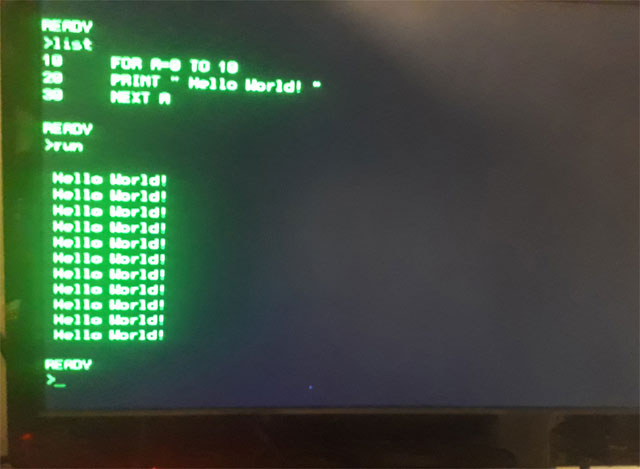
Now all the lines are attached it is time to check for short circuits, take a Ohm meter and put the pins on two socket pins near each other and do that for all pins. If there is no short circuit we can place the chips. Check the powerlines for short circuit before putting 5 volt on the board. I use a USB power supply and I cut a standard USB cable ands solder female sockets on the power lines, safe an cheap. Now connect the board to a terminal or to a PC using a TTL RS232 to USB cable and type space. When all is right you should see a basic welcome message and prompt. The basic manual download link is at the bottom of this page, have fun!
Using a AT89c52 or STC89c52 chip
The P8052-Basic chip is very rare and not available anymore, but there us a good alternative. Intel made the Basic code freeware a while ago and put the sourecode and hex files on their FTP site. I cannot find it anymore, but luckily I download everything that is interesting and so I have put the original zip file on my website to download. It contains the sourcecode and the binary hex file of the 8Kb Basic interpreter. When you use a 8052 with Flash eeprom like the 89c52 you can burn the hex code inside the microcontroller and you will have the same chip as the P8052-Basic chip. So you can build this small computer with modern parts.
8052 Basic PCB
I have a PCB for a very complere 8052 Basic computer in my webshop. This is a PCB of a Basic computer based on intel p8052-ah basic for the RCBus. (RC2014), an improved basic version for the 8052 was published in ELEKTOR 2001 (MCS BASIC-52 V1.3) This board can hold many different 8052 variants and supports a lot of different crystal oscillator configurations from 11.075 Mhz (Original) up to 22 and even 33 Mhz. The designer flashed the code into an ds89c450 running at 22.184 mhz, and that is 12x faster than an normal 8052. I build mine with a AT89C52 processor, but ANY 8052 version with at least 8Kb internal Flash will work. https://www.heinpragt.nl/?product=8052ah-basic-pcb-rc2014
My 8031 background
In 1986 I started to work as an embedded programmer and hardware designer for a small company in the Netherlands that build modems and computer equipment. At first it was only my favorite processor the Z80 but in the low cost modems we needed a cheaper microcontroller so one day I got a 8031 hardware emulator from Intel with all the development tools. As Intel provided PL/M and Assembler with their development kit I started to program in PL/M and assembler for the 8031 processor. I really fell in love with this processor and struggled to get all the code into a single eprom and only use the internal ram. In the second modem I got a 8032 so that gave me 128 bytes of extra ram and in the next redesign we implemented an Atmel version so we needed no external eprom anymore, bringing the chipcount down. In one of the last devices I build with the 8032 I had implemented the tiny Basic as well to make the device a programmable communication controller. After that we started to make modems with V42/v42bis and MNP compression and the 8032 was not powerful enough, so we stated to use an Intel 80188 processor. But I loved the MSC-52 processors from Intel, but the next companies I worked for used the Z80 and MC6809 chips, so I have used and programmed a lot of different processor chips.
8052 and 8052-Basic related documents
- Microcontroller_idea_book.pdf – Circuits, Programs, and Applications featuring the 8052-BASIC Microcontroller – Jan Axelson.
- P8052_Basic datasheet.pdf – Scanned copy of the Datasheet.
- STC89Cxx_datasheet.pdf – STC90C52 datasheet.
- uk_BAS52.PDF – BAS52 Manual.
- bas52all.zip – The original Zip file with sourcode of the Basic52 interpreter from Intel.
More pages on embedded software
[catlist name=”Embedded software”]